> ## Documentation Index
> Fetch the complete documentation index at: https://ade-ac1c6011-dependabot-github-actions-actions-checkout-7.mintlify.site/llms.txt
> Use this file to discover all available pages before exploring further.

# AI providers

> Connect Claude Code, Codex, Cursor, Factory Droid, and OpenCode — with your own key or an existing subscription.

ADE runs **Claude Code, Codex, Cursor, Factory Droid, and OpenCode** — every chat, CTO task, and worker routes through one of these five agents. Connect at least one before starting agent work. Each can use your own API key or, where supported, an existing subscription sign-in.

## The five agents

| Agent             | Connect with                             | Typical use                                      |
| ----------------- | ---------------------------------------- | ------------------------------------------------ |
| **Claude Code**   | Claude subscription or Anthropic API key | General coding, planning, review, worker tasks.  |
| **Codex**         | OpenAI sign-in or API key                | OpenAI coding workflows and CLI-backed sessions. |
| **Cursor**        | Cursor API key (`CURSOR_API_KEY`)        | Cursor agent sessions through the Cursor SDK.    |
| **Factory Droid** | Factory sign-in or API key               | Droid agent sessions, including AGI mode.        |
| **OpenCode**      | API key, OpenRouter, or local endpoint   | Broadest model reach; local or provider-backed.  |

## The models you can reach through ADE's agents

These agents — plus OpenCode and OpenRouter routing — give you access to models from every major lab. Pick whichever fits the task.

<Frame>
  <div style={{ display: "flex", flexWrap: "wrap", gap: "1rem", alignItems: "center", justifyContent: "center", padding: "1.25rem 0.5rem" }}>
    <img src="https://mintcdn.com/ade-ac1c6011-dependabot-github-actions-actions-checkout-7/vItinaUZZs7g_Eni/media/logos/models/anthropic.svg?fit=max&auto=format&n=vItinaUZZs7g_Eni&q=85&s=84ab1eb0f4bab1e6e9256645f41fea99" alt="Anthropic Claude" style={{ height: "40px", background: "#fff", borderRadius: "12px", padding: "10px 14px" }} width="16" height="16" data-path="media/logos/models/anthropic.svg" />

    <img src="https://mintcdn.com/ade-ac1c6011-dependabot-github-actions-actions-checkout-7/rOHOavlLgV0qX4kv/media/logos/models/openai.svg?fit=max&auto=format&n=rOHOavlLgV0qX4kv&q=85&s=902f8ccf806848d04d79e471f067137a" alt="OpenAI" style={{ height: "40px", background: "#fff", borderRadius: "12px", padding: "10px 14px" }} width="16" height="16" data-path="media/logos/models/openai.svg" />

    <img src="https://mintcdn.com/ade-ac1c6011-dependabot-github-actions-actions-checkout-7/vItinaUZZs7g_Eni/media/logos/models/gemini-color.svg?fit=max&auto=format&n=vItinaUZZs7g_Eni&q=85&s=7b6b17a144245bc501a55be9e625790f" alt="Google Gemini" style={{ height: "40px", background: "#fff", borderRadius: "12px", padding: "10px 14px" }} width="16" height="16" data-path="media/logos/models/gemini-color.svg" />

    <img src="https://mintcdn.com/ade-ac1c6011-dependabot-github-actions-actions-checkout-7/vItinaUZZs7g_Eni/media/logos/models/deepseek-color.svg?fit=max&auto=format&n=vItinaUZZs7g_Eni&q=85&s=8938c8dedd64910c7eaacbc55ea29b93" alt="DeepSeek" style={{ height: "40px", background: "#fff", borderRadius: "12px", padding: "10px 14px" }} width="16" height="16" data-path="media/logos/models/deepseek-color.svg" />

    <img src="https://mintcdn.com/ade-ac1c6011-dependabot-github-actions-actions-checkout-7/rOHOavlLgV0qX4kv/media/logos/models/qwen-color.svg?fit=max&auto=format&n=rOHOavlLgV0qX4kv&q=85&s=b667b01b89d11f38c1969dd383762203" alt="Qwen" style={{ height: "40px", background: "#fff", borderRadius: "12px", padding: "10px 14px" }} width="16" height="16" data-path="media/logos/models/qwen-color.svg" />

    <img src="https://mintcdn.com/ade-ac1c6011-dependabot-github-actions-actions-checkout-7/vItinaUZZs7g_Eni/media/logos/models/mistral-color.svg?fit=max&auto=format&n=vItinaUZZs7g_Eni&q=85&s=019478237f38f8091a5afa1dd5965d92" alt="Mistral" style={{ height: "40px", background: "#fff", borderRadius: "12px", padding: "10px 14px" }} width="16" height="16" data-path="media/logos/models/mistral-color.svg" />

    <img src="https://mintcdn.com/ade-ac1c6011-dependabot-github-actions-actions-checkout-7/vItinaUZZs7g_Eni/media/logos/models/meta-color.svg?fit=max&auto=format&n=vItinaUZZs7g_Eni&q=85&s=77db078c183d5e6c1f1a70d6e7d19a11" alt="Meta Llama" style={{ height: "40px", background: "#fff", borderRadius: "12px", padding: "10px 14px" }} width="16" height="16" data-path="media/logos/models/meta-color.svg" />

    <img src="https://mintcdn.com/ade-ac1c6011-dependabot-github-actions-actions-checkout-7/vItinaUZZs7g_Eni/media/logos/models/grok.svg?fit=max&auto=format&n=vItinaUZZs7g_Eni&q=85&s=cf15b1e72ccfce9e63115009a5bf7d04" alt="Grok" style={{ height: "40px", background: "#fff", borderRadius: "12px", padding: "10px 14px" }} width="16" height="16" data-path="media/logos/models/grok.svg" />

    <img src="https://mintcdn.com/ade-ac1c6011-dependabot-github-actions-actions-checkout-7/rOHOavlLgV0qX4kv/media/logos/models/ollama.svg?fit=max&auto=format&n=rOHOavlLgV0qX4kv&q=85&s=5287d3e91cc9a75c77779f7b283b0945" alt="Ollama" style={{ height: "40px", background: "#fff", borderRadius: "12px", padding: "10px 14px" }} width="16" height="16" data-path="media/logos/models/ollama.svg" />

    <img src="https://mintcdn.com/ade-ac1c6011-dependabot-github-actions-actions-checkout-7/rOHOavlLgV0qX4kv/media/logos/models/perplexity-color.svg?fit=max&auto=format&n=rOHOavlLgV0qX4kv&q=85&s=9c0db3be35fd9eeb2337bedc4f2318dd" alt="Perplexity" style={{ height: "40px", background: "#fff", borderRadius: "12px", padding: "10px 14px" }} width="16" height="16" data-path="media/logos/models/perplexity-color.svg" />

    <img src="https://mintcdn.com/ade-ac1c6011-dependabot-github-actions-actions-checkout-7/vItinaUZZs7g_Eni/media/logos/models/cohere-color.svg?fit=max&auto=format&n=vItinaUZZs7g_Eni&q=85&s=aadeb413c83be2c980db5902ae812e9b" alt="Cohere" style={{ height: "40px", background: "#fff", borderRadius: "12px", padding: "10px 14px" }} width="16" height="16" data-path="media/logos/models/cohere-color.svg" />
  </div>
</Frame>

## Connect a provider

<Steps>
  <Step title="Open Settings → AI Connections">
    Choose the agent you want to connect.
  </Step>

  <Step title="Add credentials or sign in">
    Paste an API key, sign in with a subscription, configure a local endpoint, or authenticate the provider CLI.
  </Step>

  <Step title="Verify">
    ADE probes the provider CLI and lists its available models. A green status means it's ready to start a session.
  </Step>

  <Step title="Choose defaults">
    Set your default chat model and any role-specific overrides for CTO, workers, or specific lanes.
  </Step>
</Steps>

Per-agent key steps are below.

<AccordionGroup>
  <Accordion title="Claude Code" icon="anthropic">
    Sign in with a Claude subscription or paste an Anthropic API key. ADE runs Claude through the bundled Claude Agent SDK, so the `claude` CLI does not need to be installed separately. See [Claude Code](/ai-tools/claude-code) for lane context and permission modes.
  </Accordion>

  <Accordion title="Codex" icon="openai">
    Sign in with your OpenAI account or provide an API key. Codex runs as a CLI-backed session and reaches OpenAI models.
  </Accordion>

  <Accordion title="Cursor" icon="arrow-pointer">
    Provide a Cursor API key (or set `CURSOR_API_KEY` in the environment ADE launches from). ADE recognizes the key as valid auth and discovers Cursor's available models at startup. See [Cursor](/ai-tools/cursor).
  </Accordion>

  <Accordion title="Factory Droid" icon="robot">
    Sign in with Factory or provide an API key. Droid runs as an agent provider and supports AGI mode for larger autonomous tasks.
  </Accordion>

  <Accordion title="OpenCode" icon="layer-group">
    Toggle OpenCode on; ADE downloads and manages the binary and local server. OpenCode is what powers API-backed and local-model chats — back it with an Anthropic or OpenAI key, an OpenRouter key for any model, or a local OpenAI-compatible endpoint such as LM Studio or Ollama. See [OpenCode & Windsurf](/ai-tools/windsurf).
  </Accordion>
</AccordionGroup>

## Permission presets

Providers expose different native permission models. ADE maps them into a small set of practical choices.

| Preset style     | Use it when                                                |
| ---------------- | ---------------------------------------------------------- |
| Plan / read-only | You want the agent to inspect and propose first.           |
| Default / edit   | You trust the lane and want normal coding flow.            |
| Full access      | You are in a trusted environment and want minimal prompts. |
| Custom           | You want the provider's own config to decide.              |

Set stricter modes for unfamiliar repositories. The full mapping lives in [Permissions](/configuration/permissions).

## Cost and usage

Running several agents in parallel can spend quickly. Use cheaper models for routine follow-up and stronger models for planning, architecture, and hard debugging. The top-bar **Usage** popup shows live provider quota windows and lets you set a budget cap; **Settings → Stats** is the retrospective view of token, cost, and GitHub activity.
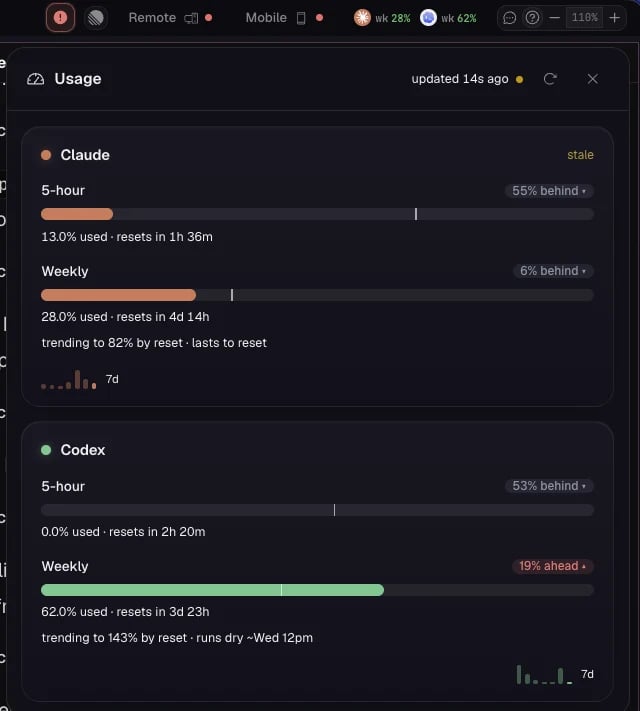
<Frame caption="Live provider usage and quota windows in the top-bar Usage popup.">
  <img src="https://mintcdn.com/ade-ac1c6011-dependabot-github-actions-actions-checkout-7/vItinaUZZs7g_Eni/media/features/settings/provider-usage.webp?fit=max&auto=format&n=vItinaUZZs7g_Eni&q=85&s=90633e020463f5a8fb56e462bb8e5541" alt="Per-provider usage and quota windows in ADE" width="640" height="711" data-path="media/features/settings/provider-usage.webp" />
</Frame>

<Warning>
  Provider calls go directly from your machine to the provider or local endpoint you configure. Keep keys out of committed files — ADE stores them in local encrypted settings.
</Warning>

<CardGroup cols={2}>
  <Card title="Permissions" icon="shield-check" href="/configuration/permissions">
    Lane scope, provider modes, and how secrets are handled.
  </Card>

  <Card title="Settings" icon="sliders" href="/configuration/settings">
    Every Settings section and a first-pass order.
  </Card>
</CardGroup>
